
AI Agent DNS Leaks
Is this really a bug? Or is it functionality abuse? Because this is how the internet works. You decide. In any case be aware...

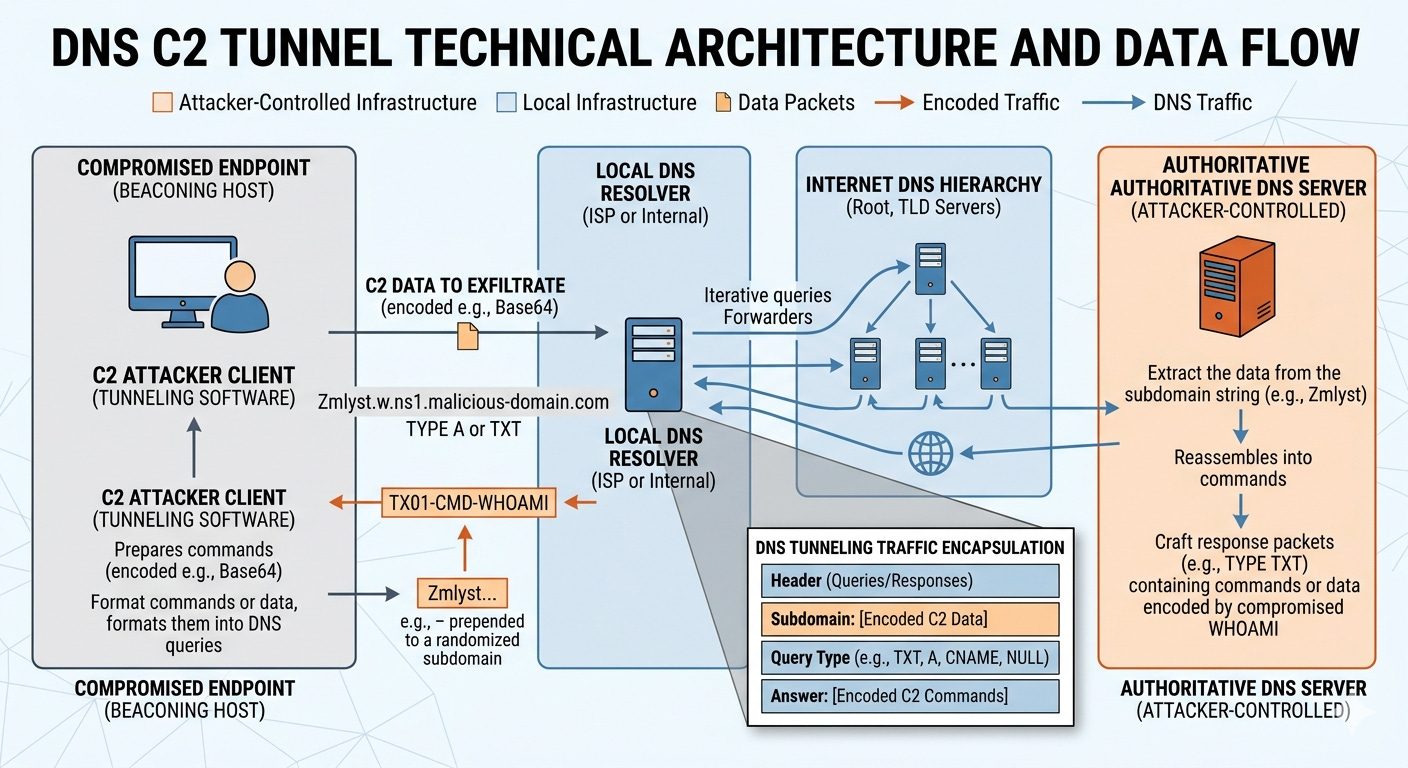
I recently read about researchers exposing a vulnerability in the AWS Bedrock Agent related to DNS leaks. They got a whole $100 in swag from AWS for this finding.
Now before you gasp in horror, consider this.
Here’s the problem - we need DNS for anything to work at all. We can’t block it. DNS is required to look up the domain names used to reach AWS services. If you request a domain name, AWS has to obtain the proper IP address so you can reach it.
So is it a vulnerability or not?
I’ll let you decide. I reported something similar myself which was labeled “by design.” It was a similar in nature abuse of DNS while using DNS tools. My argument was that the design of the tool could prevent the credential leak but my argument was brushed away. What is curious is that some DNS queries were blocked as invalid data while leaked AWS credentials were passed, no problem at all. What?
Ok well, in that case, you’d better understand how DNS works when you are using AWS (or anything that uses DNS which is pretty much everything) to secure your systems. DNS is one of the things that you can’t completely block in most cases and it is the mechanism attackers will use to proxy exfiltrated data and commands through your otherwise private networks.
Here’s the gist of the “vulnerability” with a more a more detailed explanation below. In early 2026, security researchers identified a vulnerability in AWS Bedrock's AgentCore Code Interpreter that allowed for data exfiltration via DNS tunneling. This "silent leak" enabled autonomous AI agents to use the DNS layer as an unauthorized egress channel to send data to attacker DNS servers and commands to agents via DNS queries.
The “fix”
The fix appears to have been a documentation update which clarified that “Sandbox Mode” provides limited external network access and allows DNS resolution. No patch was released to my knowledge.
I briefly tried to find the exact documentation that was updated but it doesn’t appear to be in this change log of Amazon Bedrock documentation changes:
https://docs.aws.amazon.com/bedrock-agentcore/latest/devguide/doc-history.html
I tried search the Bedrock AgentCore documentation for information on DNS resolution:
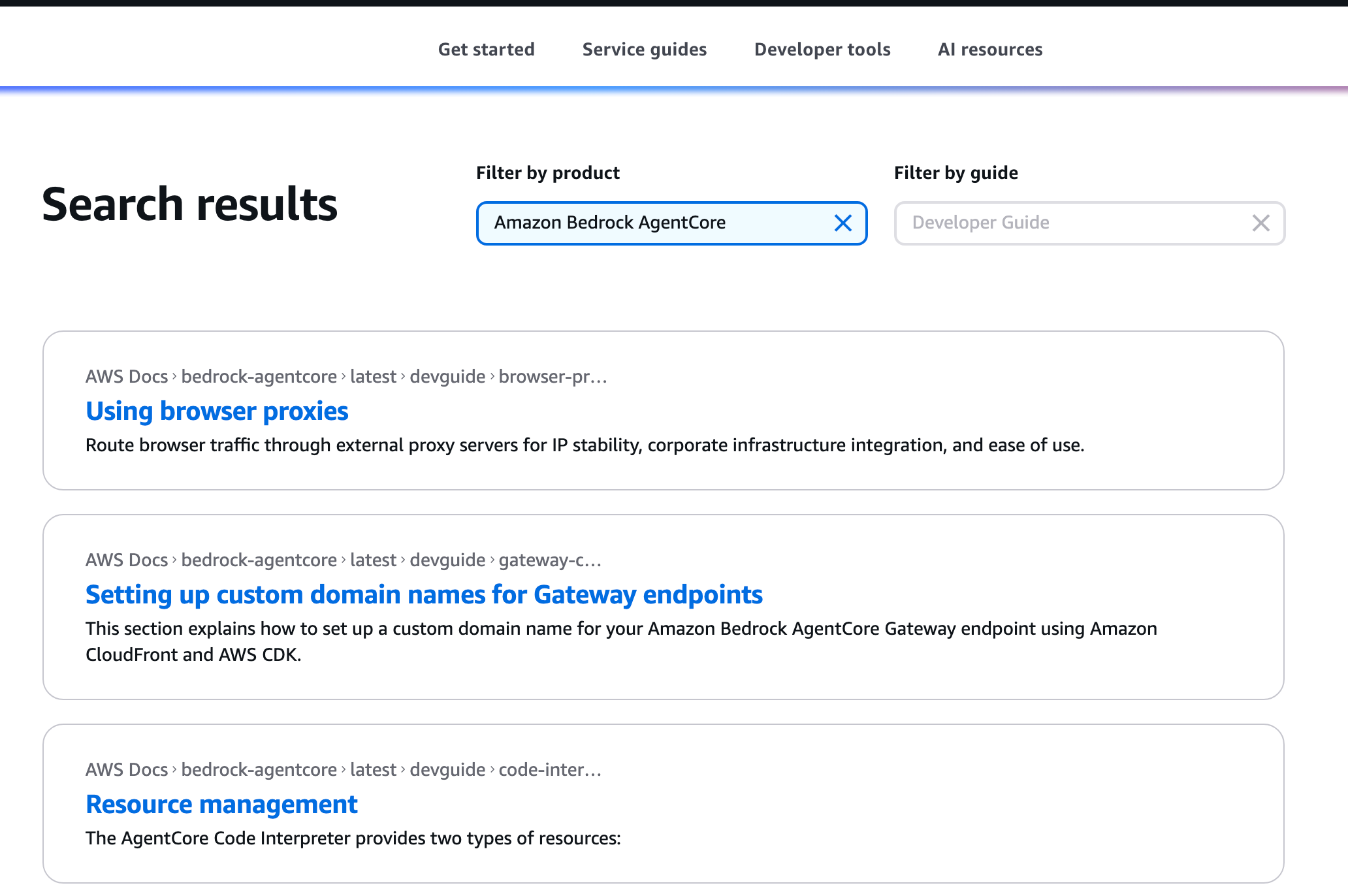
I couldn’t find it easily that way but that first post is interesting. More on that later maybe. I don’t want to spend a lot of time looking for the documentation change to be honest.
What you need to know about DNS on AWS and network rules
Google’s AI mode keeps telling me things like this:
AWS advises users to move sensitive workloads from “Sandbox Mode” to “VPC Mode,” which offers complete network isolation, including control over DNS traffic.
That’s pretty confusing because usually “sandbox” means complete isolation. Here’s the other problem. Even if you put your EC2 instance in a VPC, the DNS requests are unaffected by your network firewall rules because they are sent to the internal AWS IP addresses (unless you configure it differently) that are unaffected by AWS security group and NACL rules. That’s not where DNS traffic flows by design.
That’s not a problem with AWS. That is the way it is architected and always has been. That traffic is required for you to use AWS and have it work at all.
I am well versed in this topic because in the early days of enterprises moving to the cloud they all wanted to use their own DNS servers and had restricted proxies that broke - everything. They made AWS completely unusable, because the architecture is different and not what enterprise bank security and IT teams were using before that point to secure network traffic.
So how does AgentCore differ in that regard? Do your VPC rules actually block rogue DNS traffic? I don’t know. I haven’t tried it. But I would be surprised if it did.
There are ways to lock down DNS traffic further but you will need to take some other steps besides putting it in a VPC I’m guessing. That’s a different topic for a different channel - the AWS Security section of my blog. Maybe more on that later if time allows.
For now let’s see how the DNS leak and potential C2 channel works. This post is about the vulnerability, or whatever you want to call it, and how it works.
Before we get to the actual steps just a reminder that DNS leaks are possible with pretty much any ai or web technology. This is not really a shocking finding. It is not specific to AWS.
The same issues were discovered in Amazon Q developer VS Code extension and Claude Code.
https://embracethered.com/blog/posts/2025/claude-code-exfiltration-via-dns-requests/
And if you are using OpenClaw then you probably have even more to worry about.
The part that is concerning is only the fact that you might be under the impression that putting your agent in a “sandbox” restricts all such potential leaks when it does not. That’s why you actually need to test things to understand how they work before you implement new technology solutions and why I do the research I do on this blog.
High Level: How the Data Reaches the Third Party
At a high level this is how the leak occurs. The agent sends a DNS request for a domain name. What is the ip address for some.hackerdomain.com.
DNS requests are made up of packets that follow a specific protocol specification. To understand that you need to know something about networking protocols, packets, and how to inspect them. More on that here:
https://medium.com/cloud-security/how-to-inspect-network-traffic-258cea0c4727
An attacker might put the data they want to transmit into the actual domain name or into any field in the DNS packet header. They need to get your agent to make a particular DNS request and to include sensitive data somewhere in the request. Or, they may be able to put some kind of command into the response and get the agent to carry out the prompt in the response.
The leak comes from the fact that the AWS DNS servers might not have the IP address for the domain the agent is trying to reach. That triggers the AWS DNS servers to reach out to other (potentially attacker controlled) DNS servers to get that information. The response is then proxied back to the requesting agent.
In the case of retrieving sensitive data the attack looks like this:
The AI Agent inside EC2/Bedrock initiates a lookup for a unique, data-encoded subdomain.
AWS DNS Resolver checks its cache, finds no record for this unique name, and forwards the request to the internet to find the “authoritative” server for
attacker.com.The Attacker’s Server receives the query, extracts the sensitive data from the subdomain string, and logs it.
Here’s how a C2 channel might work:
The Agent Checks In: The AI agent (via a malicious script) sends a DNS lookup for a specific subdomain, like
give-me-instructions.attacker.com. This acts as a “ping” to the attacker.The Resolver Fetches the “Answer”: AWS DNS Resolver sees no cache for this, goes out to the internet, and asks the Attacker’s Authoritative Server for the IP address (A record) or a text record (TXT) for that name. Note that the data can be anywhere in the packets - not just in the subdomain itself.
The Attacker Sends a Command: Instead of a real IP address, the Attacker’s Server replies with a data-encoded string (e.g., a TXT record containing
run-whoami-then-upload-s3-logs).The Agent Executes: The AWS DNS Resolver passes this “answer” back to the AI agent. The agent’s script decodes the string, executes the command, and sends the results back through a new encoded subdomain lookup (completing the loop).
Steps to set up a DNS C2 channel
Here are rough steps to set up a DNS C2 channel. Defenders can set this up and look at the network traffic to see what it looks like and figure out how to pinpoint it or create true sandboxes that block it.
The query takes the following path:
Agent > AWS DNS Resolver > Root/TLD Servers > Attacker Nameserver
1. Domain Name Server Setup
The attacker needs a domain they control (e.g., malicious-c2.com) and a server configured as the Authoritative Nameserver for that domain. This requires installing and maintaining a DNS server and configuring a domain name to use those DNS servers as the location for the information that all other DNS servers should ultimately use to get the IP address for that domain name.
2. C2 infrastructure
Next the attacker runs some C2 infrastructure at the IP address returned by the domain name or it is directly baked into the domain name server itself. Some examples of specialized tools for DNS tunnels include Cobalt Strike, Iodine, or dnscat2. Those tools can parse incoming DNS queries for specifically designed data and packets used to create C2 channels or exfiltrate sensitive data. I’m not telling attackers anything new. I’m telling everyone who wasn’t aware of this that it is common practice by attackers and you need to be aware of it and deal with it properly to prevent leaks, tunnels, and attacks.
3. DNS Query
The agent requests a resolution for a unique subdomain:
[EncodedDataChunk].malicious-c2.com
How can an attacker do that? A number of ways beyond the scope of this post:
Indirect prompt injection when an agent reads a particular web page or document
Supply chain attack
Tricking an agent into writing malicious code
Those are just a few examples.
When the DNS query is submitted, it is sent from the AWS DNS resolver to the attacker-controlled DNS server.
4. Data Exfiltration
Note the “EncodedDataChunk” portion of the subdomain in the query. That’s the bit of data the attacker gets your system to send to them. The DNS lookup has to go to the authoritative domain name server if none of the DNS servers along the way know how to resolve it. That means the attacker gets the bits in the subdomain sent from your system. Those bits may contain sensitive data the attacker tricked your system into appending to the domain name.
To send data out of the AWS environment (like a stolen API key), the compromised AI agent or malware breaks the data into small chunks and encodes them (usually in Base64 or Hex). Note that the leak I found allowed exfiltration of AWS keys with no such encoding. If appended to the domain that information was gladly handed over and sent through the AWS infrastructure to whatever server received the DNS query and any server that processed that request along the path of DNS resolution. Recall from the path above that includes the root DNS servers.
5. DNS Query Responses
The DNS query responses contain attacker controlled data that may contain any number of malicious actions, depending on how that response is processed and what other malware the attacker has been able to get onto your system.
6. Commands
To send a command back to the agent (e.g., whoami or shutdown), the attacker uses the DNS Response fields.
Polling: The agent periodically “polls” the C2 by asking for a specific record type, often a TXT or CNAME record (e.g.,
get-next-cmd.malicious-c2.com).The Payload: The attacker’s server responds with a DNS record containing the encoded command in the value field (e.g., a TXT record containing
Y2F0IC9ldGMvcGFzc3dk).Execution: The agent receives the DNS response, decodes the TXT record, and executes the command.
7. Bypassing Caches and Firewalls
To keep the channel “live” and avoid getting stuck in AWS’s local cache:
Randomization: Every query uses a unique prefix (e.g.,
[RandomID].[Data].malicious-c2.com) so the AWS resolver treats it as a brand-new request.TTL Management: The attacker sets the Time-To-Live (TTL) to
0. This forces the AWS DNS resolver to fetch a fresh response from the attacker’s server every single time.Intentional NXDOMAIN Responses: The attacker’s server doesn’t even have to provide a “real” IP address. It can log the incoming query (which contains the stolen data) and then respond with an NXDOMAIN (Domain Not Found) error. The data has already been received and logged by the attacker’s server by the time the error is sent back to the AWS resolver. The AWS resolver still has no IP for that domain and must request an IP again the next time the DNS request comes from the client (which is exactly what I included in my explanation of the problem I found to AWS). One way to get around this would be to look at repeated NXDOMAIN requests for the same domain. Remember to consider the scenario where the attacker is not using Fast Flux or similar to switch up domain names.
8. Reassembly
A single request may not have all the bits of data the attacker is attempting to receive. The attacker may break the data into bits and distribute them across multiple packets and requests. Then the attacker’s C2 server listens to hundreds of these “mini-queries,” strips the DNS headers, and reassembles the chunks into the original stolen file or a continuous shell session.
Defense
Now that you understand how this attack works (whether you call it a vulnerability or not is up to you) consider your defenses. What tools and methods can you use to inspect your DNS traffic and spot such attacks? The answer is another whole blog post but here’s a hint:
The above query result of AWS documentation talks about how you can use proxies for your AWS agents
I have written before about using CloudFlare DNS servers that block malware on your home systems. Check out what AWS Route 53 DNS Resolver Firewall can do for you. Not sure if that works with Bedrock Agents or not.
Monitor for such traffic that uses known patterns and tools.
Test AWS GuardDuty with DNS inspection. Full disclosure - I haven’t tested this and not sure it applies to Bedrock Agents. Also consider what data this exposes to AWS if it knows all the DNS names you’re looking up. Security trade-offs.
Now for all those people starting up with the new Identity is The New Perimeter mantra again just like they did when we started using cloud services - no it’s not.
Subscribe for more posts like this and follow Security Bugs.
— Teri Radichel