

Artificial Intelligence
When people talk about using Artificial Intelligence (AI) that may refer to a wide range of use cases. For example, they might be:
Using a chatbot to ask questions like ChatGPT or Google’s aimode or Amazon Q in the AWS console.
Amazon uses AI and machine learning to produce product recommendations on their website and has for years.
Using developer tools like Kiro IDE, Kiro CLI, Cursor or Claude Code to to “vibe code.”
Adding an AI element to your website to use AI bots to act as customer service agents.
Using generative AI to produce text and images such as Google’s AI mode that answers questions in natural language or Nano Banana that generates images based on what you ask it to create.
A bank may leverage AI to review all their transactions to determine if any are fraudulent or a security tool may look for security vulnerabilities or threats.
AI in your email system (which is a bit of a security risk if you ask me) can read and summarize your email.
The idea is that machines can have some form of intelligence and that they can “think” but really they are leveraging statistical models to try to guess rather than using deductive reasoning. In other words it’s using statistics rather than logic.
Machine Learning
Machine learning (ML) is a subset of artificial intelligence that enables computers to learn from data, identify patterns, and make predictions or decisions without being explicitly programmed for every scenario. By analyzing large datasets, ML algorithms iteratively improve their accuracy, transitioning from rigid rules to automated, data-driven insights.
Generative AI
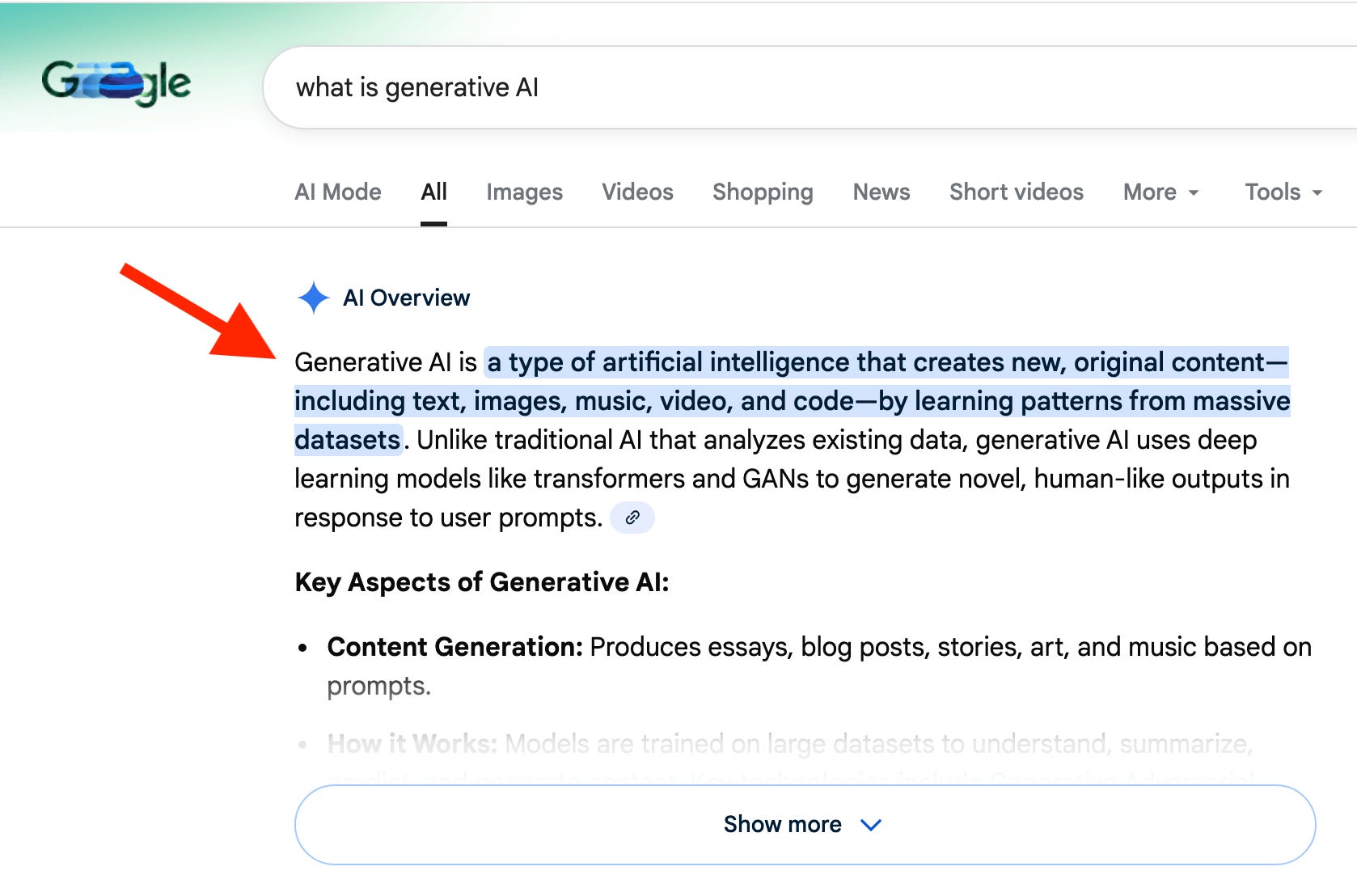
Generative AI is a particular form of AI where you give a model a prompt and it generates text, images, audio, or video based on the information you give it. You’re already using generative AI if you use google search. You enter a question and it generates a human readable answer instead of a list of links. The text is essentially a prediction of what it thinks the answer to your question is based on being trained on lots and lots of data across the internet.
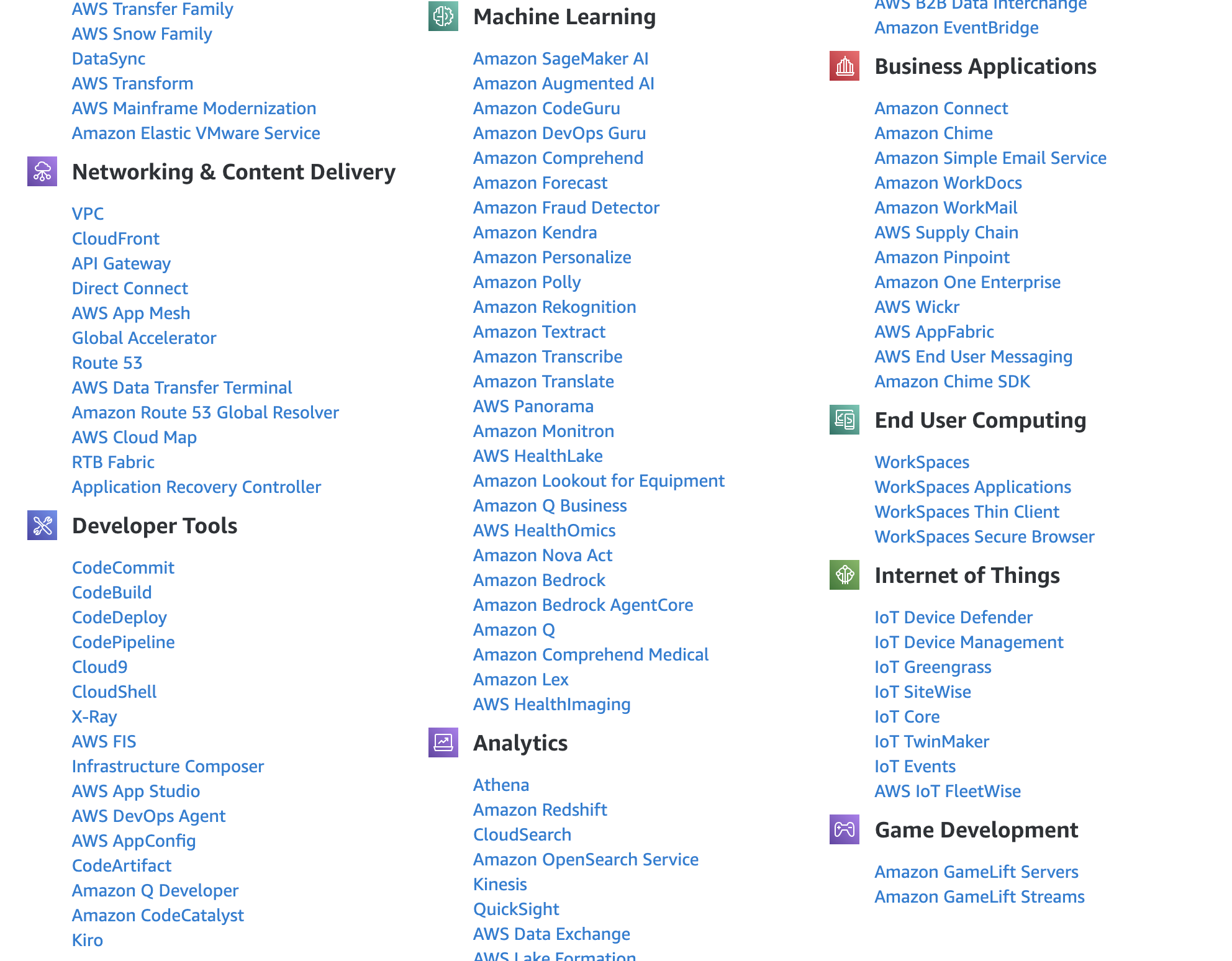
The AWS generative AI strategy
Amazon’s generative AI strategy includes three tiers aimed at different target audiences.
The lowest layer services are aimed at ML researchers and data scientists building proprietary models from scratch. This tier includes infrastructure like AWS Trainium and Inferentia and Amazon SageMaker for those training models from scratch.
The middle layer of services are aimed at developers and enterprises that want to use and fine tune existing models by leveraging Amazon Bedrock and related services. Amazon manages some of the of the infrastructure while giving customers the ability to choose which model they use and how they tune it. Bedrock also offers agents that run in sandboxes and the ability to create guardrails for security and safety.
The top layer of services offer applications such as Amazon Q and Kiro and other industry specific solutions where individuals leverage existing models in applications without complex fine tuning or training, though some customizations are available. One of the key differentiators with Kiro is the ability to use spec-driven development and autonomous agents.
AWS Tranium and Inferentia
AWS Trainium and AWS Inferentia are both custom-designed machine learning (ML) chips from Amazon Web Services optimized for different stages of the AI lifecycle at a more cost-effective price point than competing hardware.
Trainium chips are optimized for training massive models, including large language models (LLMs) and foundation models (defined below). Trainium is designed to be deployed in EC2 UltraClusters. This allows you to scale up to tens of thousands of chips connected as a single, massive supercomputer.
Trainium instances are purpose-built Amazon EC2 resources designed for high-performance deep learning model training while reducing costs by up to 50% compared to similar GPU-based instances. Training huge models requires constant communication between chips to sync data. Trainium uses Elastic Fabric Adapter (EFAv2) networking, which provides a non-blocking, petabit-scale interconnect to eliminate communication bottlenecks. Trainium instances include large amounts of shared accelerator memory known as high bandwidth memory (HBM) per instance. This is critical for storing the massive "state" (the math being updated) of a model during the training process.
Inferentia chips are specifically designed for low-latency, high-throughput deployment of pre-trained models. These chips support scale-out distributed inference, allowing models exceeding the memory capacity of a single chip to be split and run across a cluster of chips working together as one. This capability enables efficient execution of models with hundreds of billions of parameters. LLMs are often memory-bound, meaning the speed of the answer is limited by how fast data can move from memory to the processor. Amazon’s latest instance featuring Inferentia chips is a massive leap forward in that regard.
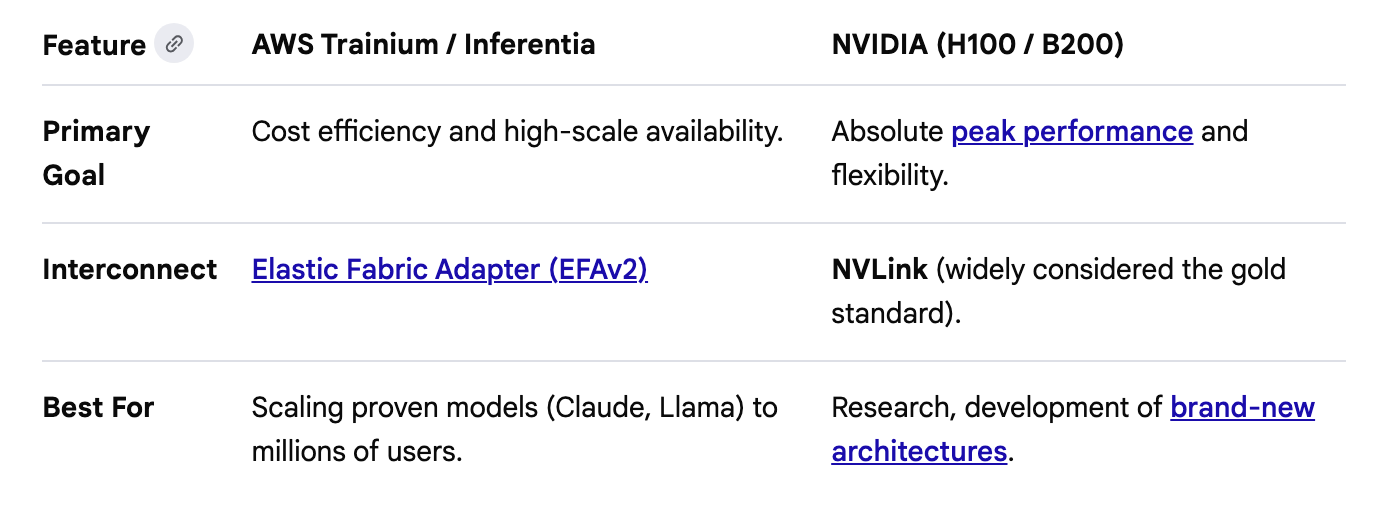
How do these chips compare to NVidia? Here’s Google AI’s take but test them out for yourself:
If you are training the next world-record model and money is no object, you use NVIDIA H100s or B200s. If you are scaling an application to millions of users and want to cut your monthly cloud bill in half, you move to AWS Inferentia or Trainium.
NVIDIA on AWS
You can use NVIDIA on AWS as well if you need it. Also, Google notes that the cost-savings applies to top tier NVIDIA chips and at-scale production environments.
https://aws.amazon.com/nvidia/
AI models
An AI model is a computer program or algorithm trained on massive amounts of data to recognize patterns, make predictions, or generate content. The tricky thing here is that you need a mountain of data to get a decent model and do an enormous amount of data processing to create a useful model. Creating models involves massive amounts of computer storage and processing power.
The AI models used for generative AI are called Large Language Models. The difference between Google search before generative AI was that they learn how to produce accurate answers differently. Google Search ranks pages based on authority and links. An LLM (like Nova) determines the “correct” answer based on statistical probability—it predicts the most likely sequence of words based on the consensus of the data it saw.
AWS generally lets you choose the model you want to use with their services. You are not bound to using only AWS models, though they do offer their own models as a cost-effective option for some use cases. They also offer tools and services to create your own models.
Tokens
A token is the fundamental unit of information that an AI model processes. A token might be a word, a part of a word, or a pixel in a graphic. You can think of tokens as the “atomic building blocks” of data, much like how atoms build molecules or Lego bricks build a model.
Since computers cannot understand raw text or images, they use a process called tokenization to break that data down into smaller, manageable chunks that can be converted into numbers.
Foundation models
Foundational models are statistical models that understand the relationship between tokens. They are not “thinking” in the human sense; instead, they use massive amounts of math to determine which tokens (pieces of words or images) are most likely to appear together.
Because they are trained on a massive, general-purpose scale, they act as a base that provides the grammar, logic, and reasoning skills necessary for more specialized work. They don’t have a “source of truth”—they have a map of relationships.
Amazon offers Nova foundation models which customers can build upon to create models designed for their own specific use cases.
https://aws.amazon.com/nova/models/
Different types of foundational models
A Large Language Model (LLM) is a specific type of foundation model that is trained on natural language. They are typically used for understanding and generating human language. Other types of models may be focused on Vision or Audio. When a model is designed to do all of those things it is referred to as Multimodal. The more powerful a model is and what it can do may affect what it costs to use that model.
Training
In the world of AI, training is the process of adjusting a model’s internal mathematical weights so that it can accurately recognize patterns and make predictions. This process involves feeding data into the model and adjusting its weights or the relationship between different data points to improve performance. Optimal training will help a model calculate which tokens (pixel or words) belong together.
Pre-training
Pre-training is the initial, most massive stage of creating an AI model. It is where a blank slate program becomes a Foundation Model by absorbing the patterns of human language and general world knowledge. Essentially it reviews massive amounts of data, tries to guess the next word, and then see if it got it right. If it misses, it automatically adjusts its internal math to ensure a better guess next time.
Fine-tuning
Fine tuning is the process of taking a foundational model and enhancing it to improve performance for a specialized task or industry. This process involves changing the model’s internal weights to target the particular domain in which it will be used. It can also include behavioral adjustment to refine the output the model produces to match a certain tone, dialect, or language. Because the model already knows how to “speak,” fine tuning requires a fraction of the resources required to create a foundational model.
Inference
Inference is the final stage of the AI lifecycle where the model is actually put to work. While training and fine-tuning are about building the model, inference is about using that model to answer a question or generate an image.
Foundation vs. Frontier Models
Sometimes you’ll hear the word foundation vs. frontier models.
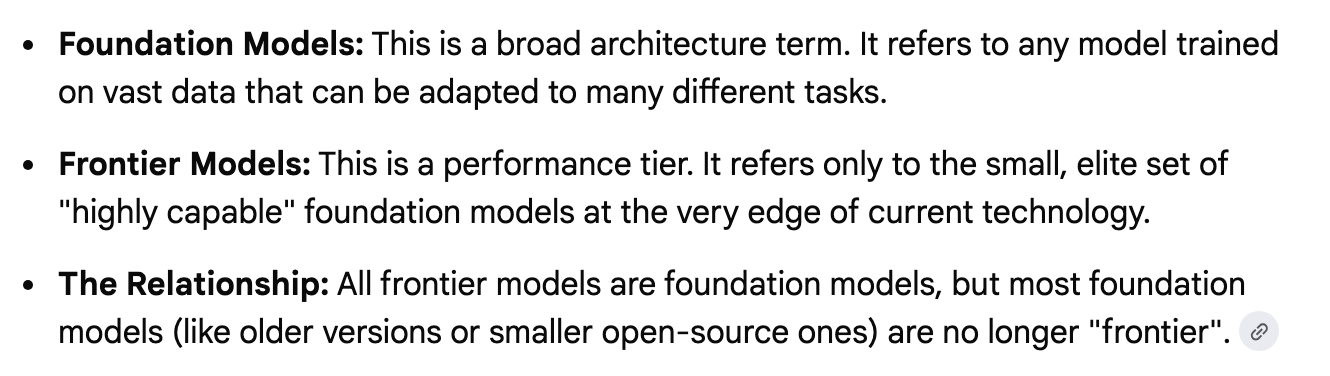
Essentially it’s saying that frontier models are more cutting-edge. All Frontier Models are Foundation Models, but not every foundation model is considered "frontier.”
To me the distinction is a bit like splitting hairs. There’s no technical definition for when a frontier model is a foundation model. As Google puts it:
Technically, there isn't a "graduation ceremony" where a model switches from one to the other because they aren't mutually exclusive. However, in the industry, the transition happens when the focus shifts from capability research to commercial utility.
Build your own Frontier Model
At AWS re:Invent 2025, AWS announced a new service - Amazon Nova Forge - which is designed to let customers build their own frontier models.
Nova Forge customers can start their development from early model checkpoints, blend their datasets with Amazon Nova-curated training data, and host their custom models securely on AWS. Nova Forge is the easiest and most cost-effective way to build your own frontier model.
Cost-effective is all relative. Building a model is extremely expensive. Mind the which you can apparently only see when you log into the AWS console.
https://aws.amazon.com/nova/pricing/
Here’s what Google’s AI answer is on the cost of Nova Forge:
Amazon Nova Forge costs approximately $100,000 per year. This AWS service allows enterprise clients to customize Amazon's AI models during the training process rather than just fine-tuning them afterward. The fee does not include computing costs or additional support from Amazon experts.
RAG (Retrieval-Augmented Generation)
Training involves embedding the details into the model to generate correct answers. Due to the cost, companies are now leveraging another technique called RAG (Retrieval-Augmented Generation) which allows AI models to look up information from external data sources to produce answers in real time. Many of the AWS AI tools have support for RAG from different data sources.
Amazon knowledge bases:
This is the “all-in-one” RAG solution. You point Knowledge Bases at your data (like an Amazon S3 bucket containing PDFs or docs), and AWS automatically:
Chunks the data into small pieces.
Converts them into “vectors” (mathematical representations of meaning).
Stores them in a vector database for the AI to “look up” later.
Amazon RAG Database options:
Amazon OpenSearch Service: The most common choice for high-performance RAG.
Amazon Aurora (pgvector): Great if you already store your business data in a PostgreSQL database.
Amazon Neptune: Used for “Graph RAG,” which helps the AI understand complex relationships between data points.
Some AI services on AWS include tools and features to orchestrate searching the data and feeding it into the model when it is needed.
Amazon Bedrock vs SageMaker
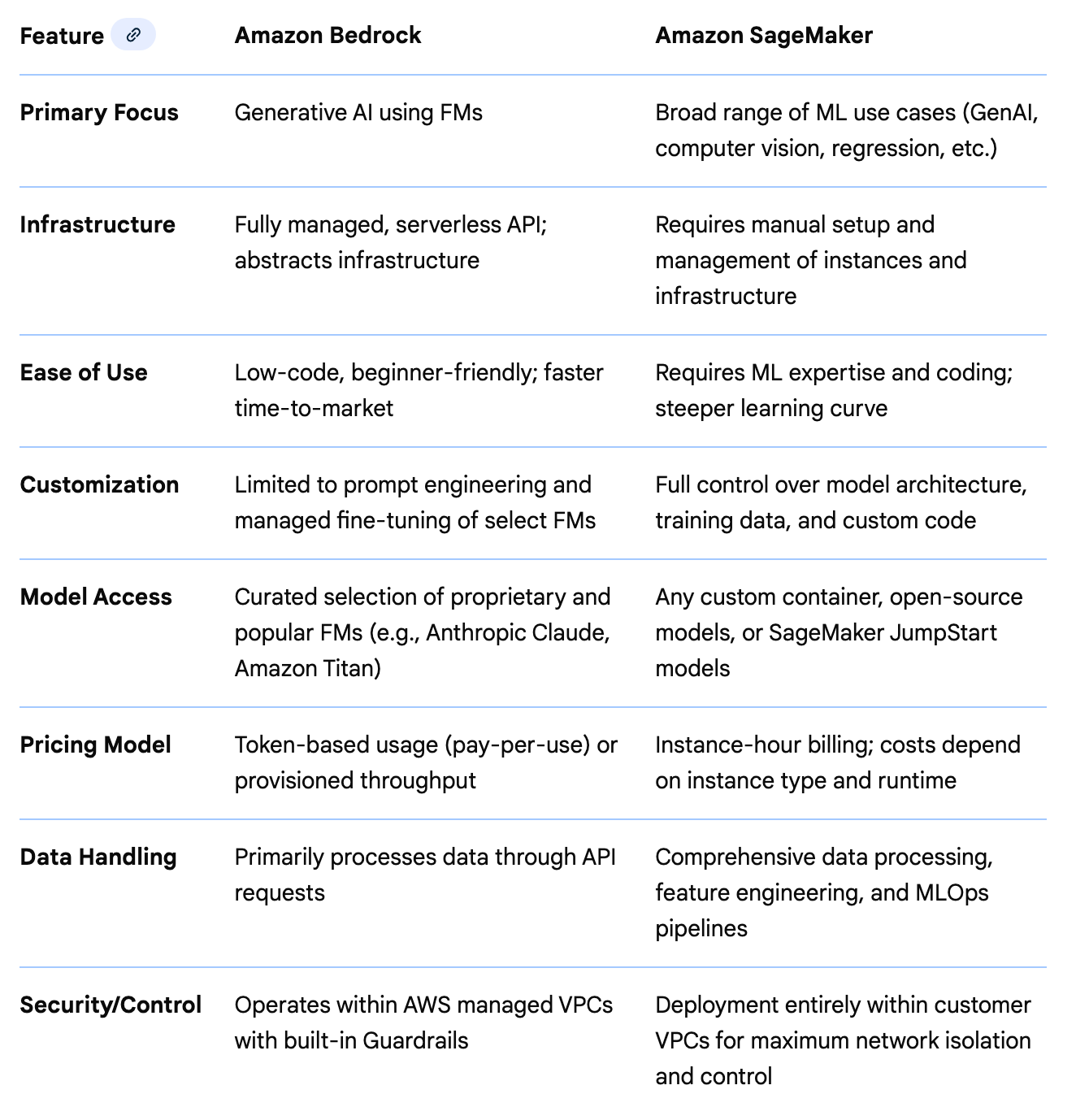
When people want to create their own models they use tools that are very flexible but complex and require a lot of technical knowledge about machine learning and artificial intelligence. If you are a machine learning expert you might be using a tool like Amazon SageMaker. It offers a studio with the type of tools machine learning experts use to do their work.
https://aws.amazon.com/sagemaker/
Amazon Bedrock aims to provide a simpler tool to use that handles some of the things you might do in Amazon SageMaker for you. It was created to make AI and machine learning easier to use. It also focuses more on Generative AI - the branch of AI that creates text, images, audio and video based on prompts (the text you give the model to produce your desired output). Here’s how Google summarizes the difference between the two using their generative AI chatbot:
AI Agents
When you make a request to a chatbot, you submit some text and get back a response. When you use an AI agent it reasons through a problem by making a plan or a series of steps and executes them, possibly by interacting with external tools and software. A chatbot just provides a response whereas an agent may take additional actions. Many developers and solutions are now using multiple agents to complete implement workflows and complete tasks for greater efficiency and accuracy.
Amazon Bedrock Model Catalog
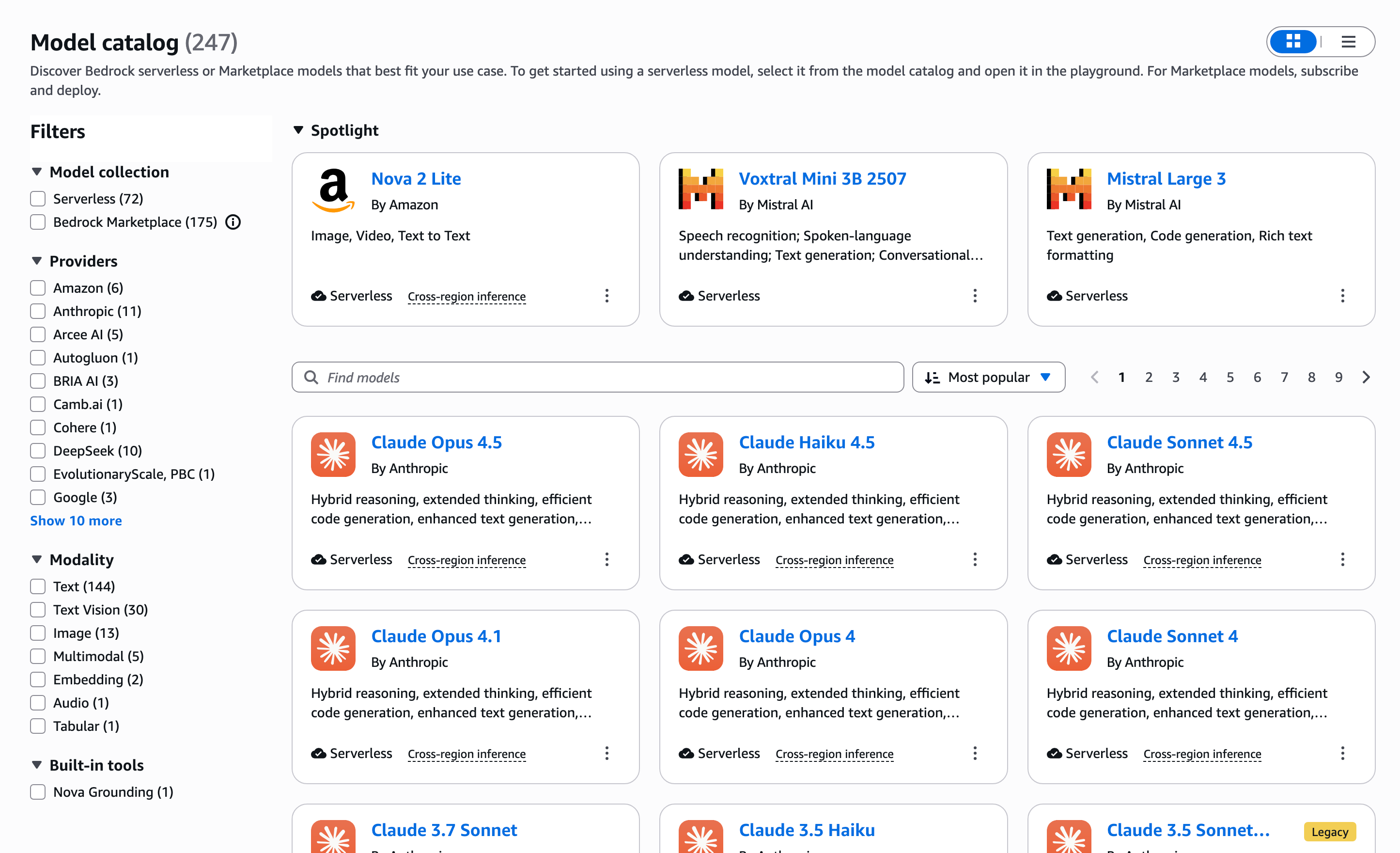
One of the key differentiators of Amazon’s approach to AI is that they let you use any model you want. They offer over 247 models in their catalog as of today when more added all the time. The other key differentiator is how they approach AI security. From the beginning they have chosen to make a copy of the model so what you submit to the model in prompts doesn’t end up in the model ro being trained by it - if using Amazon Bedrock. Read the fine print for some of the other services.
Amazon Bedrock Agents
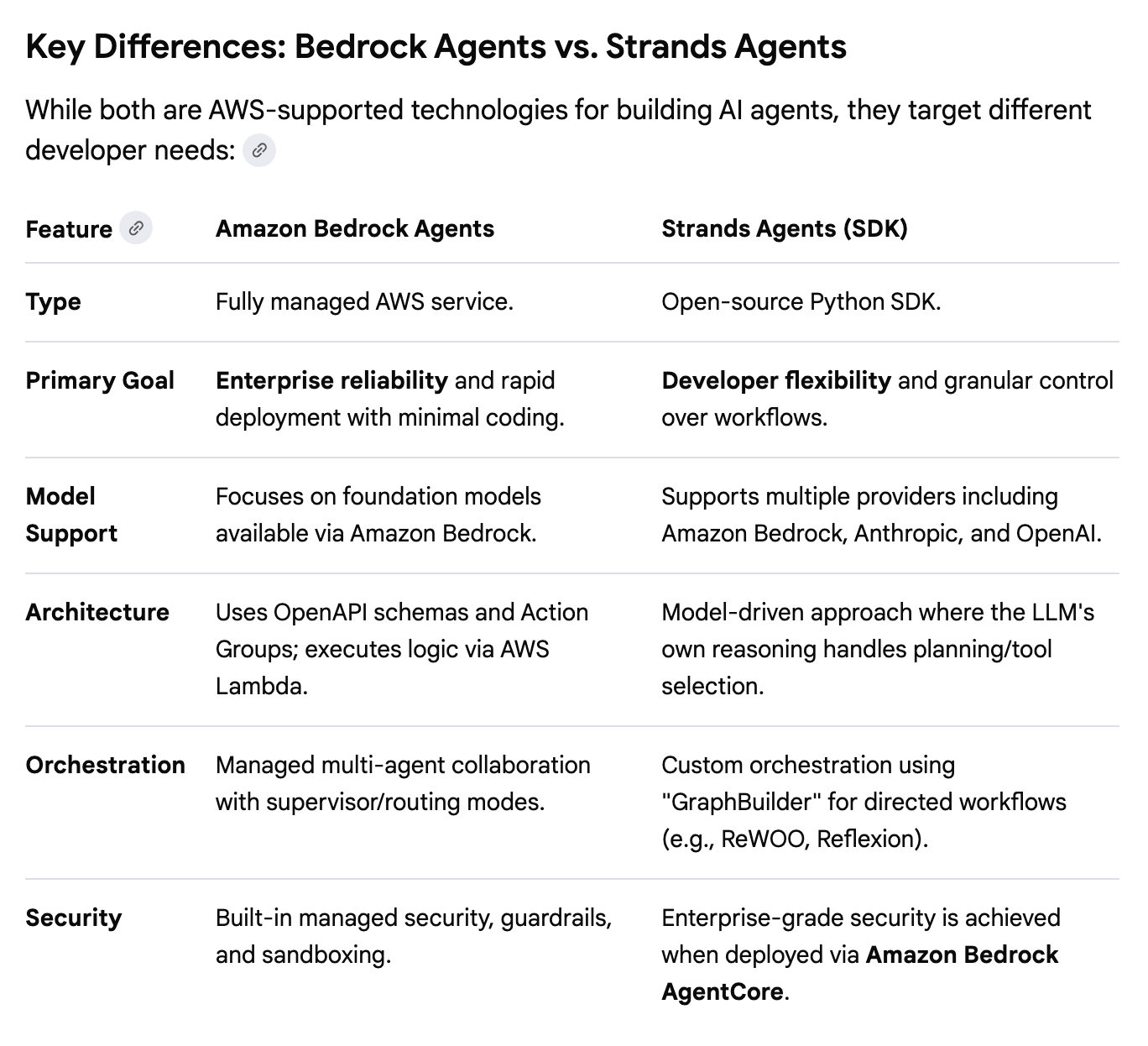
Amazon Bedrock Agents is a fully managed service designed to help you quickly create and deploy agents. One of the issues with agents is that they can do things they shouldn’t if not created with proper security boundaries. Amazon Bedrock Agents can help you set up multi-agent workflows while reducing risk by running agents in sandboxes.
https://aws.amazon.com/bedrock/agents/
Strands Agents
Strands Agents is an open-source, model-driven Python SDK that leverages the autonomous reasoning of Large Language Models (LLMs) to handle planning and tool execution. Unlike static workflows where the logic is deterministic and hard-coded, the framework allows the agent to dynamically adapt its task sequence based on real-time context.
Here’s what Google says are the key differences between Bedrock Agents and Strands Agents:
https://aws.amazon.com/blogs/opensource/introducing-strands-agents-an-open-source-ai-agents-sdk/
Amazon Bedrock Agent Core
Regardless of which tools and models you are using to build and deploy agents you can use Amazon Bedrock Agent Core to deliver secure infrastructure for that purpose.
https://aws.amazon.com/bedrock/agentcore/
MCP Servers
MCP Servers act as standardized connectors that allow AI agents to safely fetch data from platforms like Google Drive, Slack, or GitHub. Amazon offers the ability to stand up and use MCP Servers through the various services they offer. The Model Context Protocol (MCP) was developed to create a standard way for agents and AI applications to interface with third-party services.
AWS offers an MCP server specifically for Amazon Web Services:
https://docs.aws.amazon.com/aws-mcp/latest/userguide/what-is-mcp-server.html
MCP servers can be accessed by using AWS services such as Bedrock Agents.
Amazon CodeWhisperer
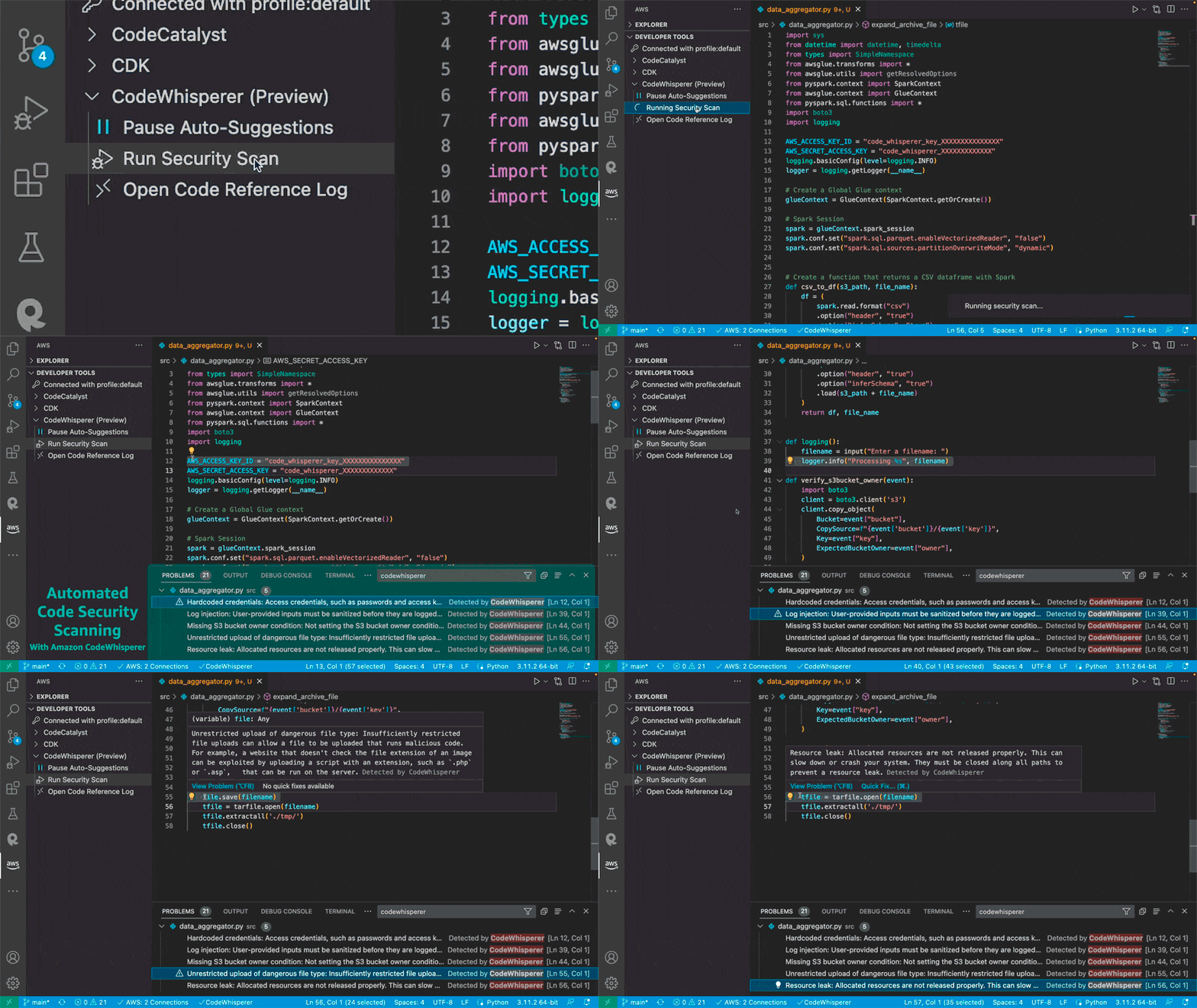
CodeWhisperer was the original AWS AI coding companion focused on inline code suggestions in software development applications used to write code (IDEs). An IDE is an application that has a graphical user interface. It is installed on operating systems that support that like Windows, Mac, and Ubuntu. I am writing about this because sometimes when I’m having issues with Kiro I’m seeing alerts for Code Whisperer in the AWS console. This tool predates the current AI developer tools AWS offers today.
Amazon Q (In the console)
Amazon released a chatbot in the AWS console and in some software development tools called Amazon Q. This tool is still available in the AWS console and can answer mostly questions about AWS services (though I have asked it related questions and can sometimes get an answer). In addition, it can if you allow it get access to query your resources to help with troubleshooting errors in your AWS account. For example, you can’t access something because a network rule is blocking traffic or you are trying to troubleshoot an IAM policy or CloudFormation template. Perhaps Amazon Q can help. It is specifically designed to help with AWS problems.
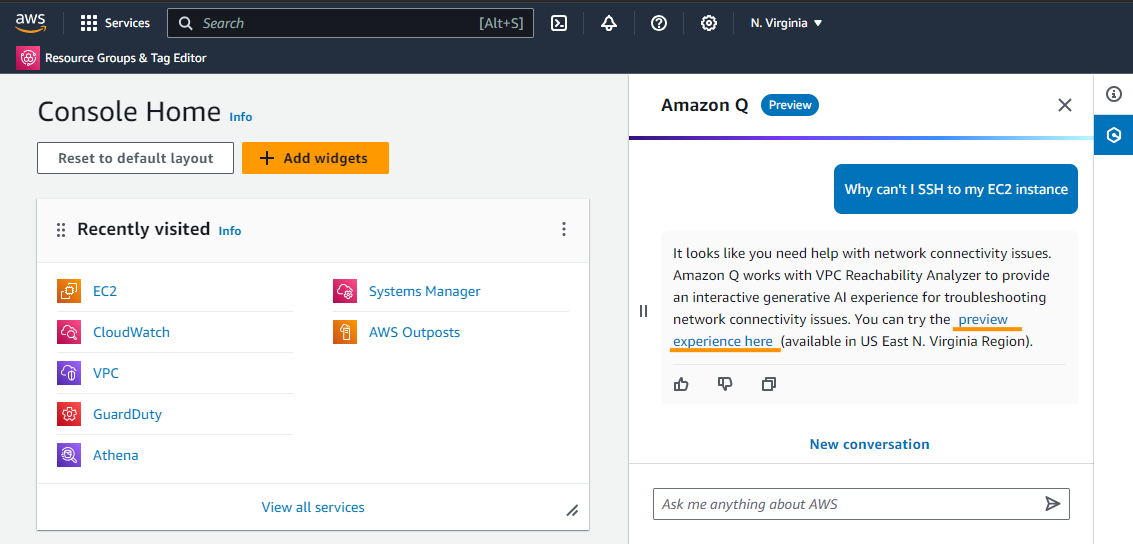
Amazon Q Business
Amazon also offers a tool called Amazon Q Business. It is a generative AI-powered, enterprise-ready chat assistant designed to enhance workforce productivity and securely connecting to company data and systems.
Amazon Q Developer Tools
Amazon also release Amazon Q Developer Tools which made use of generative AI to help produce code:
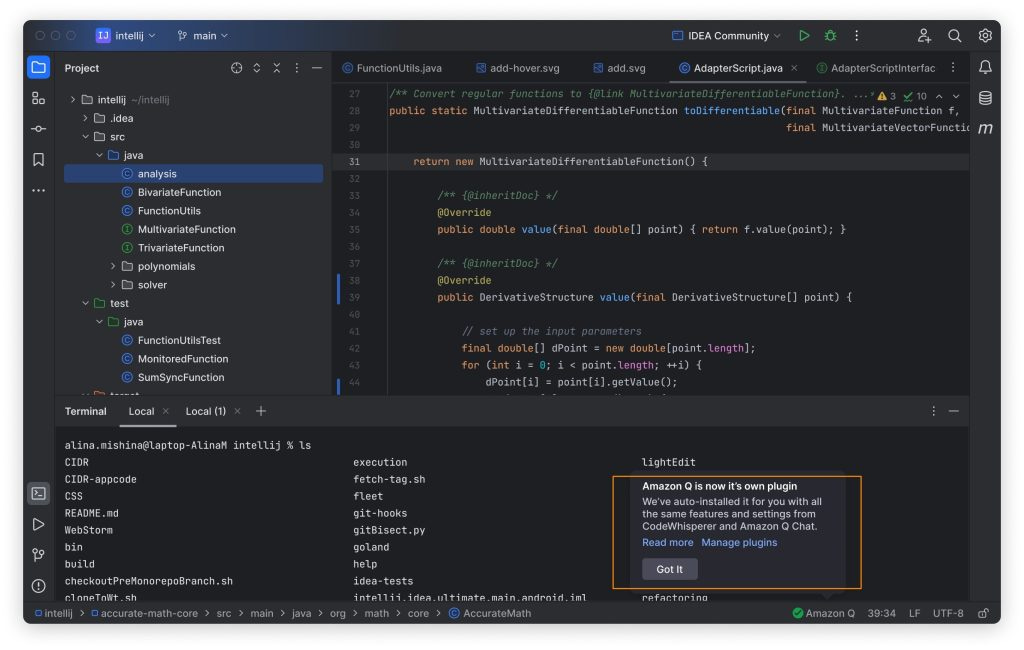
The Amazon Q CLI worked on the command line so developers could use it on an operating system like Amazon Linux which doesn’t have a built in UI. The tool runs in a terminal window, allowing developers to type commands and get responses.
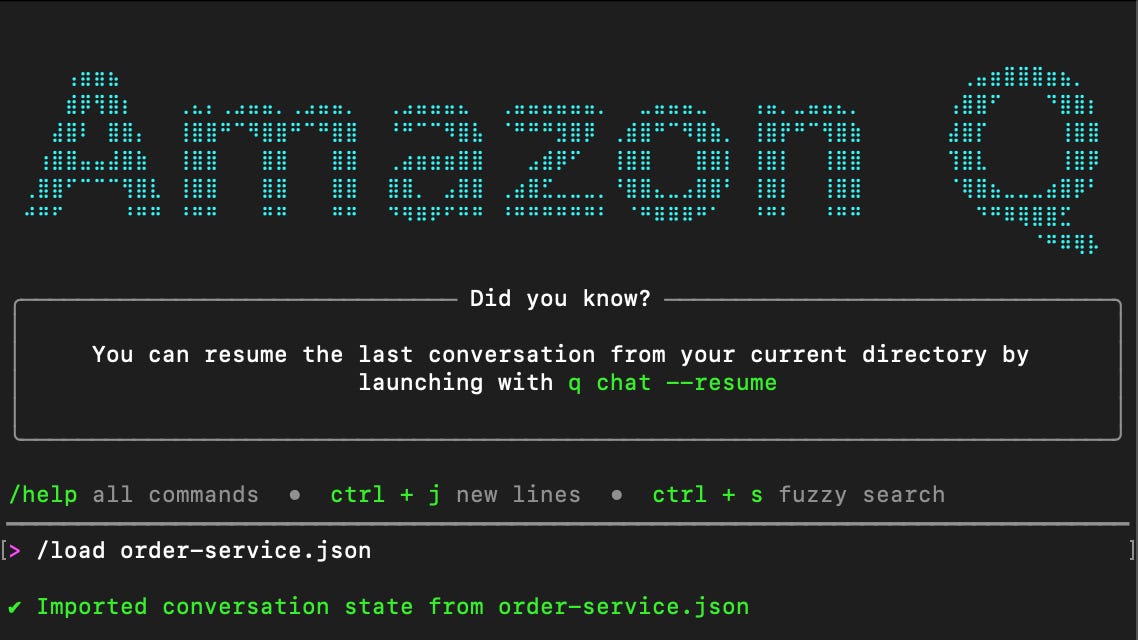
I wrote about why I like CLI tools better than IDE tools here:
https://medium.com/cloud-security/cli-vs-ide-for-ai-coding-61cb0bc2db28
Kiro IDE and CLI
Since then, Amazon released some updated tools aimed at replacing Amazon Q Developer tools specifically aimed at helping software developers write code with generative AI which they have branded Kiro.
The Kiro IDE works much differently than its predecessors and includes the concept of autonomous agents that work together to write your code and spec-driven development aimed at improving the results of AI coding assistants:
The Kiro CLI was essentially the Amazon Q CLI with a new pricing plan. However, it is getting some enhancements as of late. Something to watch:
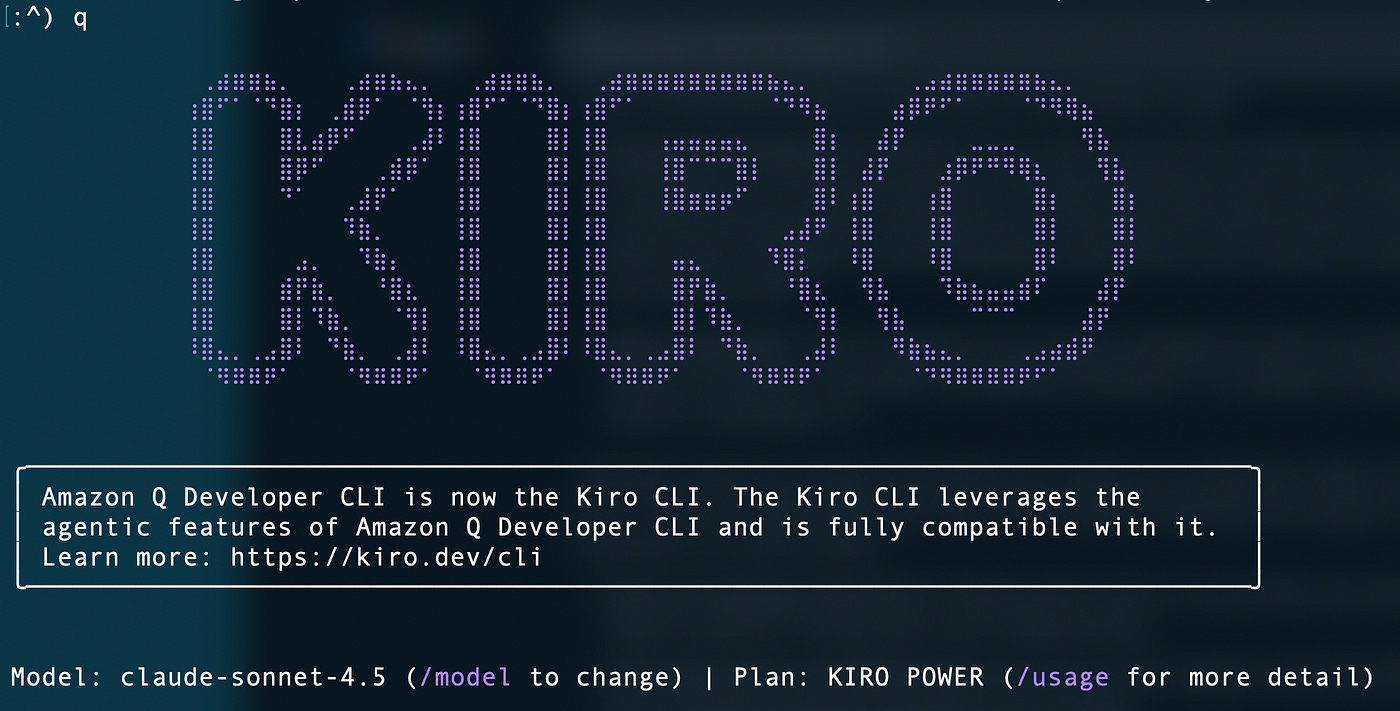
I wrote about how to upgrade from Q CLI to Kiro CLI here since that caused me some grief. Rebranding sometimes creates more work from customers so make sure it’s worth it. I do like the new name and the friendly ghost icon but it caused me some rework.
https://medium.com/cloud-security/upgrade-amazon-q-cli-to-kiro-cli-57c2c25d4fa5
I like the concept of a pay as-you-go model. The only problem is that the as-you-go pricing is higher than the monthly plan pricing so it still makes more sense to create a new plan than to pay the as-you-go pricing so it really doesn’t make sense to me. Watching to see how that evolves.
With Kiro you can also select your model. it supports Anthropic’s Claude and Nova models that are specifically optimized for software development. Once you have it installed type /models a the prompt.
Kiro Autonomous Agent
If development is your thing make sure you check out the Kiro autonomous agent announced at the last AWS re:Invent. This is an agent that works with the Kiro IDE (not CLI at the time of this writing) and works behind the scenes to write code for you while you’re doing other things. It’s driven by spec-driven development which is a part of the Kiro IDE as mentioned to help make sure what it builds is what you expect.
https://kiro.dev/autonomous-agent/
IP Indemnity
One other thing that is interesting when I was taking a look at the benefits of creating a develop account for Vibe Coding was on the advanced plans you get something called IP Indemnity. I’m not a lawyer but this should help protect against a potential lawsuit that arises from using the outputs of an AI model. Consult a legal professional for a better understanding for the exact explanation of how that can help limit liability. I wrote about that here.
https://medium.com/cloud-security/protecting-data-submitted-to-ai-models-ae9e9b268b6a
A fast-moving space!
I may have missed something and this is a fast-moving space so check the AWS products list for the latest and greatest. After I wrote this, I just saw a post from AWS CEO Matt Garman announce that a company called Fundamental has released a new class of model designed specifically for tabular data. AWS will be adding this to the models it already offers to customers in the AWS console.
AWS Wishlist for AI services
Amazon has other tools based on or using AI but this should give you a good overview of what services exist and where you might want to start your AI journey on AWS. And here’s a tip - if you have a need for something AWS doesn’t offer or have a problem using any AWS tools, you can add it to your AWS Wishlist if you create an account in the AWS Builder Center. Amazon is known for their customer obsession and may grant you your wish.
That’s your crash course on AWS services - now let’s see what we can do with them!
For more posts like this subscribe and follow Good Vibes.
— Teri Radichel