
Yubikey Push To Run A Lambda Function
Leveraging a framework to kick off deterministic or AI agent batch jobs and workflows

I spent about three years thinking about, writing, and testing my batch job framework.
https://medium.com/cloud-security/automating-cybersecurity-metrics-890dfabb6198
In this post I explain a possibly better approach to the core problem I started out trying to solve. Push a button, start a job. I’ve written about pushing buttons to take actions on AWS before. I did one post for the AWS blog using an IOT button to open network rules to allow access to something. It was pushed out and announced late on a Friday night. I haven’t written another since then.
https://aws.amazon.com/blogs/aws/just-in-time-vpn-access-with-an-aws-iot-button/
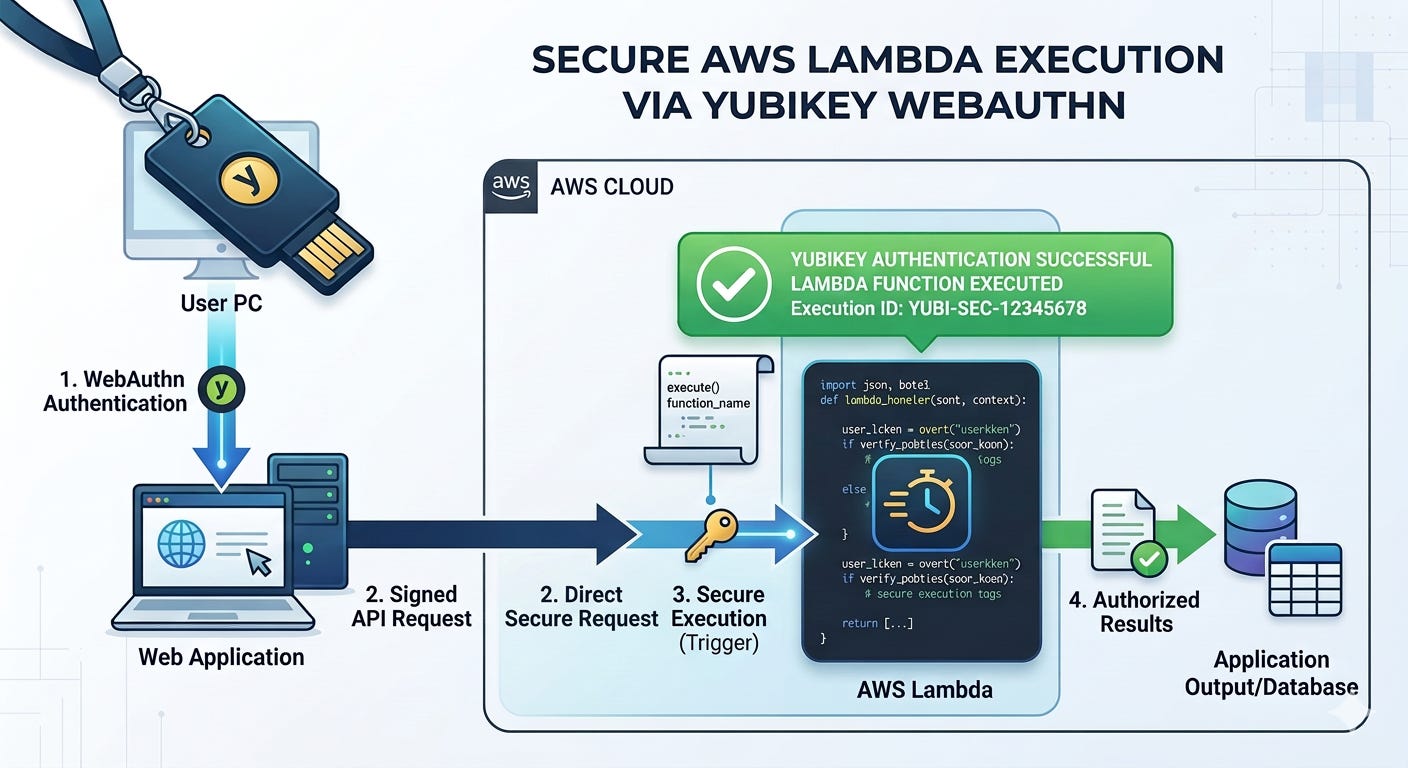
I really like the idea of pushing buttons to make things magically happen. Pushing a button is easy. Pushing a button to do almost anything on AWS is possible with the combination of a yubikey and a Lambda function.
I feel like AI has unlocked my brain. It also helped me refine and improve upon my idea, check for security gaps, document the architecture and the process flow of the whole thing. I haven’t tested all the code yet but I’m really excited to try and get it working. I know I can because I’ve already gotten so many other things working — unless Kiro told me something is possible when it is not. That’s what I’ll be finding out soon enough.
MFA to execute a batch job - revisited
I keep explaining that AI agents can really just be batch jobs if you want them to be. They can be interactive or you can run them autonomously and that’s when they essentially become batch jobs with some AI prompting in the mix.
I’ve been working on all these multi-agent jobs that use multiple agents in the jobs or multiple agent-jobs that carry out a particular workflow. I was almost to the end of a workflow but then I looped back around, once again, to think about this whole batch job framework and how I was going to deploy it all and run the jobs.
I’m running all these things but I’m kicking them all off manually and I really need to have a better way to automate execution of these things on different compute resources and with different configurations. I need them to just run all the time or on demand or via a trigger when needed. So have to deploy the underlying infrastructure and have a way to kick them off easily and securely.
And that gets me right back where I started - how can I require MFA to run a batch job? I’m not actually using MFA here. I’m just using a manner to authenticate that requires authentication to run a job - every time for each new job execution. And an easy way to do it.
I’ve thought this all through before in my past security automation posts. I had a way to use MFA to trigger a job running a container. I showed how to deploy that on an EC2 instance. But I got stuck trying to use MFA with a Lambda function. It didn’t work the last time I tried it. Something was getting blocked inside the Lambda.
I’m also tired of typing out those codes all the time. Yes, security people dislike the speed bumps too but we understand the consequences if we don’t. I’ve been thinking about how I could use a Yubikey to kick things off instead with the key requirement of no device code flow which is often phished by attackers tricking users into completing a flow they have initiated. I wrote about that here and I really, really wish people would not use this for sensitive data:
What I’m trying to implement is not just a matter of logging into a website with MFA and then you can run jobs. What I mean is EVERY TIME you execute a job you have to authenticate. That ensures that not just anyone can execute sensitive jobs using long lived credentials - or some long running session - or an implementation where an attacker can simply renew a session if it is short. Call me paranoid but in my line of work I do my best to protect customer data. I want to make sure any actions on a customer account are only initiated by me and I’m always thinking about how to make sure that is the case.
I still have one wrinkle to work out with jobs that require an MFA token to assume a role to access a remote account but I presume I can just pass the code to the Lambda function which gets passed to the job that executes on EC2. That solves my Lambda role assumption problem and actually involves three forms of authentication - the secrets in secret manager, the code passed into the job, and the Yubikey push to run the job that can get the credentials in AWS. I’ll explain that more later but if you read my older posts you probably know what I mean.
Thinking through my idea with AI
I thought through various ideas before involving a Yubikey, but the time it would take to implement would be insurmountable given my workload. But with AI - I am completely amazed how many new ideas I can try out so fast. I can’t believe the things I can accomplish now, and the things I can research and pin down so much more quickly.
I don’t use any complicated framework. I basically define my requirements in a README file as explained in this post. I forgot to mention that I direct Kiro in the steering file to follow the instructions in the README file to reinforce its behavior.
With AI I didn’t have to have every answer or a full plan up front. In fact, I think it’s easier for the agent to get things right if you build in pieces. I had this one basic objective that I put in the README:
I want to require a Yubikey with WebAuthn/FIDO2 to invoke a Lambda function.
And that’s where I started. I added that as an objective in my readme and started asking questions, because I didn’t want to limit my implementation until I explored all the possible solutions with the help of my AI compadre.
Guiding Kiro’s thought process with key requirements
I noticed Kiro was trying to use TOTP which is subject to phishing and can be read by key loggers as it passes codes around. Take a look at this comparison chart from Google’s aimode:
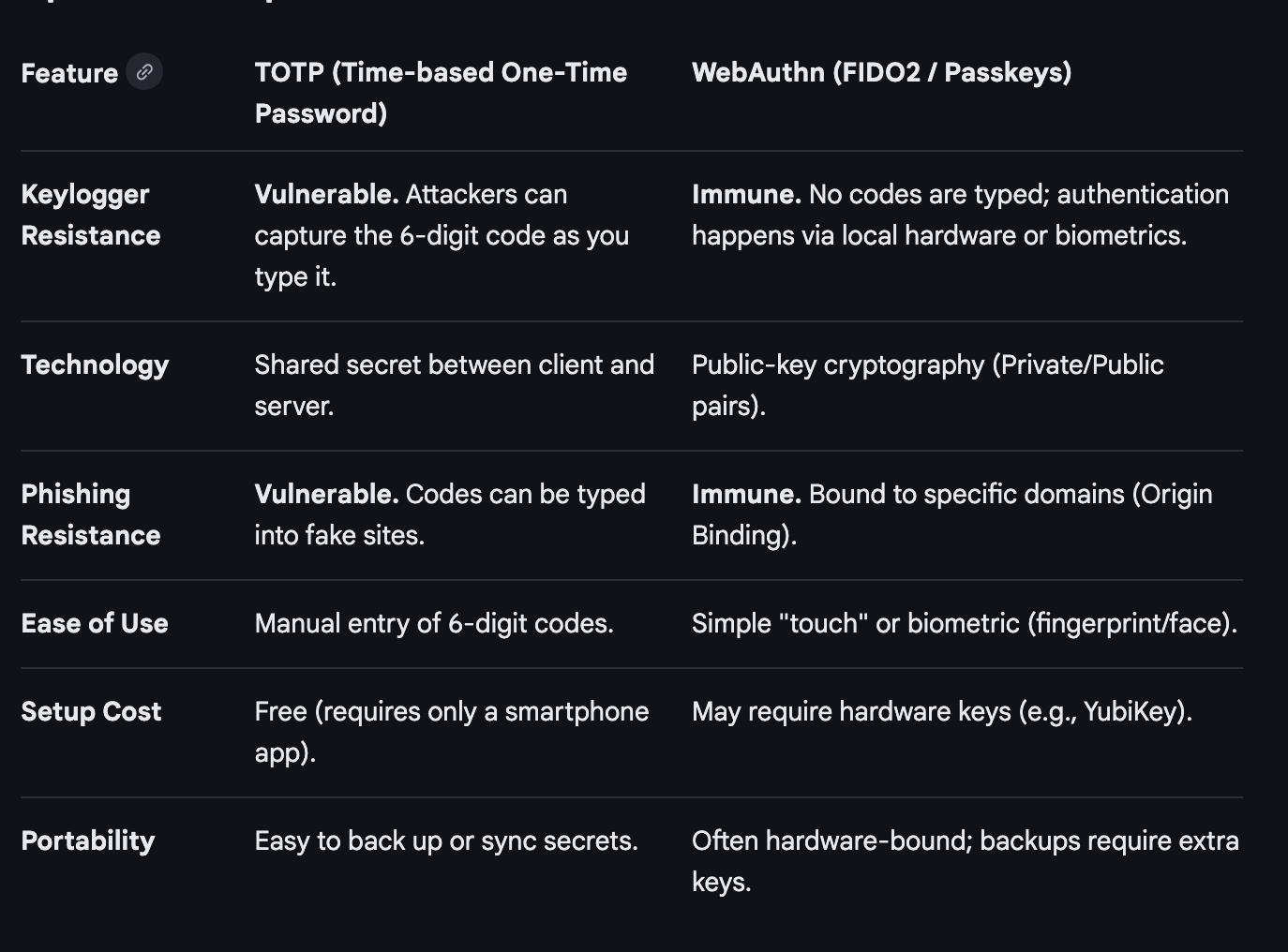
I modified my objective to specify WebAuthn/FIDO2 only to prevent the above potential vulnerabilities and attacks.
From there I started exploring different suggestions for implementing the idea. I could use Cognito but it’s more expensive. You’re counting on AWS security. It might be good for complex enterprise applications. I just want to test it out first.
I have no AWS credentials on my laptop. I don’t want to install anything on my laptop or phone to do it. That eliminated most of the options. In the end, the best way is in a browser, because the browser already has the capability built into it to exchange the cryptographic data with the Lambda function. I don’t have to install any libraries on my system.
I don’t want to run the Yubikey CLI on my system which has the capability to wipe my Yubikey and reset pins, among other things. The Yubikey library has the same problem. I could try to write my own code but chances are I’ll do something wrong. Browser it is.
To be honest I really don’t like using a browser because it has a huge attack surface. I might work on something more specific for this purpose later, but right now it is too time-consuming to rewrite the Yubikey library without the management capabilities, for example. A project for another day.
As mentioned I want to use WebAuthn and definitely no device code flow. Kiro did immediately try to implement the device code flow. Probably because the models have been trained on a lot of applications that use the device code flow for authentication. I had to direct it to use WebAuthn and FIDO2 only.
The difference between my approach and the device code flow is that there’s no point at which an attacker can insert themselves into the flow to phish the data. Let’s look at the difference. This description from Google’s aimode is decent:
WebAuthn (Web Authentication API): Designed for direct, real-time authentication between a user’s browser and an authenticator (like a security key, Face ID, or fingerprint reader) to prove identity, often using public-key cryptography. It is used for instant, local, phish-resistant authentication.
Device Code Flow (RFC 8628): An OAuth 2.0 extension specifically designed for input-constrained devices (like smart TVs, IoT devices, or printers) that cannot easily enter credentials. It involves displaying a short code on the device, which the user then enters on a separate device (like a phone or laptop).
The device code flow has a specific use case. It’s only for the use case where you have a device where you cannot directly input credentials into a device. With a Lambda function, I can pass credentials to it via WebAuthn cryptographic processes if I’m understanding the implementation correctly, so it doesn’t have that issue.
I should be able to pass the Yubikey information from my browser straight to the Lambda function unlike trying to get a a button push or code to the AWS CLI on an EC2 instance where I’m executing something in a terminal window. Passing the information from the Yubikey the wrong way makes it susceptible to key loggers as mentioned.
I added those requirements to the objective after thinking through the idea, asking Kiro questions, and exploring various options. I will inspect the implementation in more detail as I run and test the code to make sure everything is as advertised.
Architecture and process flow
This project was a bit more complicated than the simple process I outlined in my past README post. I need to make sure the architecture and flow is more explicitly documented to avoid security problems and implementation mistakes.
I recently pushed some code up to my GitHub repo that includes a readme for creating a Lambda function that deploys an S3 bucket. I’m using bash in a container. For reasons. You can see that’s pretty simple. When I write the requirements they are on separate lines when I view them in vi but on GitHub they all show up smashed together. I don’t care because my requirements are for the agent, not humans.
This project has more complexity to it. I had to think through potential security vulnerabilities and the whole flow of when the button push occurs and whether or not it is really requiring the button push at the right point. I had to figure out how to register the Yubikey’s public key and how the Lambda function would retrieve it. What library will I use to validate the button push and key exchange? How secure is it? Where might sensitive data be leaked or intercepted in some way?
Here are the key components:
An install script deploys the resources
The registration process script gets generated by the install script when it installs the Lambda function so it can contain the proper URL.
The Yubikey registration process stores the public key in DynamoDB.
The Lambda function uses a layer with the cryptographic libraries it needs.
When the user loads the Lambda it requires a button push before proceeding
If it receives and validates the push it displays a list of projects
There’s also an IP restriction for now (I could also add user name authentication or require a pin but this is just a test)
Of course everything uses HTTPS and an up to date version of TLS.
I have a future requirement to add private networking to everything
The Lambda endpoint is public even with a private network
I had Kiro describe the architecture. It did so and drew some diagrams. They were a bit hard to read. The models are still not good at producing boxes with straight lines. But it basically documented everything we discussed and I added that to the readme for future reference in an architecture section. I added the requirements below that in the format described in my REAME post. I also added a note on CORS as it applies to this implementation and a section for the process to deploy and use the implemented system.
Then I told it to implement the code and after that multiple rounds of “are there any security problems” and “check everything again” and “what is missing” type prompts. It implemented all the code.
A complete job launcher
At that point I decided to keep going. I showed in my batch job posts how I was using parameter store to store my job configurations. None of that changes with AI. The main thing I want to be able to do is use Lambda functions. All the rest of what I wrote in there should work fine though I’ve completely simplified it in one night and in theory implemented something complicated that was taking me forever before.
I explain how I use parameter store to configure jobs in my security automation posts. I used configuration files to manage the job configurations such as batching and parallel or sequential processing in my prior posts on this blog. Those configurations can be stored in parameter store and used by jobs to manage agents when executed.
But how do I actually launch a job? This where a separate job launch configuration comes in. I could run a job that is a Lambda function, a script in SSM, a container on Fargate or a bunch of agents and batch jobs coordinated by my job framework on an EC2 instance - a spot instance to be exact.
So once I got to this point I kept going…I’ve wanted to get this done forever. I can’t believe how quickly this all came together and now all the code is written. But I need to test that it actually works. I expect that will take some time. But this is so cool.
Push the button and the Lambda function gives a list of available jobs
Select a job
Push the Yubikey again to run the job
The invoker Lambda then can initiate basically any type of job based on the job name
The job configuration is stored in Parameter Store just like my past implementations
But now I have two configurations per job - the one for the invoker and the one for the job execution.
The invoker reads the invoke configuration and from that it launches a Lambda or an EC2 instance at the moment.
It uses an EC2 launch template for the EC2 configuration keeping my job configuration focused on the actual work to be done.
I can have a separate launch instance for each job to right size my instance - and it will generally be a spot instance.
There’s no way to set a max price in the launch template so I added the capability to do that in my invoker - if the current spot price is too high it won’t run until later.
If it’s a Lambda, the job name is the Lambda name.
If it’s an EC2 the name is passed into the EC2 metadata.
I haven’t implemented this yet but the job launcher could run anything - a Bedrock AI Agent, a script in SSM Parameter store, A Fargate container…
When the job runs it pulls the execution config and goes from there - just like my batch framework did before.
A Lambda function runs with an execution role
An EC2 instance runs with a role on the EC2 instance.
They can run in a completely isolated network unless they need Internet access.
So push a button to get a job list. Push a button to run the selected job. That’s it.
Beyond that I’ve already got a job deployer in the works that runs as a Lambda function - that can be kicked off as a job!
So in theory (I’m still testing) I can now run my jobs anywhere, any time and requires MFA to kick them off. I can completely optimize the compute size, use spot instances to save money, run agents in parallel or sequentially as mentioned in my last post, use Lambda, EC2 and it would be simple to add other compute types as well.
It sounds nice, but as mentioned I haven’t tested all the code yet so we’ll see if it works. So far I’ve been able to get most things I try working quickly with the help of a guided AI agent so hopefully the code written so far after some troubleshooting will be running later today. Maybe tomorrow.
Wish me luck!
Subscribe for more stories like this and follow AWS Security.
— Teri Radichel